
5 Best Autopano Giga Alternatives in 2025
Autopano Giga is legendary, but it’s discontinued. Whether you need faster stitching, HDR support, or a free open-source tool, here are the top replacements.
Disclaimer: This page contains affiliate links. If you buy through them, we may earn a commission at no extra cost to you.
🏆 Quick Top Picks
| Software | Best For | Price | Link |
|---|---|---|---|
| PTGui Pro | Professional Stitching | Paid | Visit Site |
| Insta360 Studio | 360 Video & Easy Pano | Free (w/ Camera) | Check Deals |
| Hugin | Free Open Source | Free | Download |
PTGui Pro (The New King)
If you are looking for the direct spiritual successor to Autopano Giga, PTGui Pro is the answer. It is currently the industry standard for professional panoramic photographers and virtual tour creators.
Unlike Autopano, which relies on older CPU algorithms, PTGui utilizes modern GPU acceleration (OpenCL), making it lightning-fast—often 10x faster than Autopano. It handles HDR stitching effortlessly and supports masking just like Autopano’s “Anti-Ghosting” tool.
Why switch from Autopano?
- Speed: Stitches gigapixel images in seconds, not minutes.
- Modern OS Support: Fully compatible with Windows 11 and macOS Sonoma (Native Apple Silicon support).
- Batch Stitching: Superior batch builder for processing hundreds of panoramas.
Verdict
Best for: Professionals who need speed and support.
Price: ~$205 USD (Pro Version)
Insta360 Studio (Best Modern Workflow)
In 2025, the tedious workflow of shooting overlapping DSLR photos and stitching them manually is becoming obsolete for many users. The modern solution is a 360° Camera paired with its proprietary software.
Insta360 Studio is free desktop software that comes with their cameras. It uses AI to stitch dual-lens footage instantly. There are no control points to manage, no ghosting issues, and no horizon leveling required—the camera’s gyroscope handles it all automatically.
Why choose this over Autopano?
- Zero Effort Stitching: The “Optical Flow Stitching” is automatic and invisible.
- 8K Resolution: The new Insta360 X4 captures massive 8K 360° photos and videos.
- Free Software: The Studio software is completely free and regularly updated.
Editor’s Choice
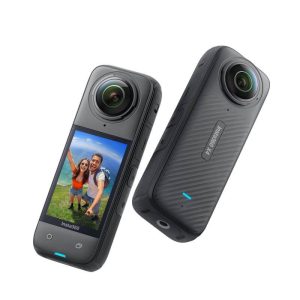
Best for: Real estate tours, travel vlogs, and quick 360 content.
Hugin (Open Source & Free)
Hugin is the closest free equivalent to Autopano Giga. It is an open-source cross-platform panoramic imaging toolchain based on Panorama Tools. It allows for the assembly of a mosaic of photographs into a complete immersive panorama, stitching any series of overlapping pictures and much more.
However, be warned: The learning curve is steep. Unlike Autopano’s one-click interface, Hugin requires you to manually set control points and understand projection mathematics. But once you master it, it is incredibly powerful.
Key Features
- 100% Free: No watermarks, no trials, forever free.
- Cross-Platform: Runs natively on Linux, Windows, and macOS.
- Advanced Control: Offers granular control over photometric optimization and lens calibration.
Verdict
Best for: Linux users and students on a budget.
Price: Free (GPL License)
Adobe Lightroom Classic (The “Already Have It” Option)
If you are a photographer, you likely already pay for the Adobe Creative Cloud subscription. Lightroom Classic has a built-in “Photo Merge > Panorama” feature that is surprisingly capable.
It creates a DNG (Raw) panorama, retaining all dynamic range for editing. While it lacks the advanced “Little Planet” projections or manual control points of Autopano, it is the perfect tool for simple landscape stitching without leaving your library.
Microsoft ICE (Legacy Free Option)
Microsoft Image Composite Editor (ICE) is another legendary free tool that, like Autopano, has been discontinued. However, it still works on Windows 10/11.
It is famous for its “Stitch from Video” feature and incredible speed. While not as feature-rich as PTGui, it is much easier to use than Hugin. If you are on Windows and want a free tool that “just works,” seek out an archive of ICE.
Feature Showdown: Autopano vs. Rivals
| Feature | Autopano Giga | PTGui Pro | Hugin | Insta360 Studio |
|---|---|---|---|---|
| Price | Free (Dead) | $150+ | Free | Free (Hardware) |
| GPU Acceleration | ❌ (Slow) | ✅ (Fast) | ❌ | ✅ |
| Anti-Ghosting | ✅ (Manual) | ✅ (Auto) | ❌ (Hard) | ✅ (AI) |
| HDR Stitching | ✅ | ✅ | ✅ | ❌ |
| User Difficulty | Medium | Medium | Hard | Very Easy |
Note: Autopano’s lack of GPU support makes it significantly slower on modern 4K monitors compared to PTGui.
How to Choose the Right Stitching Software in 2025
Replacing a tool as powerful as Autopano Giga isn’t easy. Modern photography has split into two directions: automated 360° cameras and high-end DSLR gigapixel stitching. Here is a detailed breakdown of the 5 critical factors you must consider before making a decision.
Optical Flow vs. Control Points (The Core Technology)
The biggest technological shift since Autopano was discontinued is the rise of Optical Flow Stitching. Understanding the difference is key to your workflow:
- Control Points (Traditional): Used by Autopano, PTGui, and Hugin. The software identifies matching pixels in overlapping images and warps them to fit. This offers extreme geometric precision but often fails when subjects (like people or cars) move between shots, creating “ghosting” artifacts that require manual masking to fix.
- Optical Flow (Modern AI): Used by Insta360 Studio and Mistika VR. This AI-driven method analyzes the movement of pixels and “morphs” the image to hide seams seamlessly. It solves parallax errors and ghosting automatically without user intervention. If you shoot action sports, crowds, or handheld video, Optical Flow is mandatory.
RAW Processing & HDR Support
If you are a professional real estate photographer, dynamic range is everything. You are likely shooting 3 or 5 bracketed shots per angle to capture both the dark interior and the bright window view. Autopano Giga excelled at Exposure Fusion.
In 2025, PTGui Pro is the only modern alternative that handles HDR .EXR and 16-bit TIFF files correctly. It allows you to stitch the bracketed sets first and then merge them, or merge first and then stitch. Free tools like Hugin often degrade color depth (banding issues) or struggle with tone mapping algorithms. Do not compromise here if you plan to edit your panoramas in Lightroom or Photoshop later.
Hardware vs. Software Workflow
Ask yourself: Do I actually enjoy the stitching process? For 90% of users, the tedious workflow of “Shoot 12 photos -> Transfer to PC -> Stitch -> Debug Errors -> Export” is dead.
A dedicated 360 Camera (like the Insta360 X4) does the stitching in-camera or via a free mobile app instantly. Unless you need 200+ Megapixel resolution for large-format printing, hardware-based stitching is vastly more efficient for virtual tours, Google Street View, and social media. The time saved usually pays for the camera within a few projects.
Speed & GPU Acceleration
Time is money. Autopano Giga runs on code from 2018 that relies heavily on the CPU. It is notoriously slow on 4K/8K video projects or massive gigapixel photos.
Modern software like PTGui uses OpenCL to offload heavy calculations to your Graphics Card (NVIDIA/AMD). A complex stitch that takes 10 minutes in Autopano might take only 45 seconds in PTGui on a modern PC. If you process volume (e.g., 50 houses a week), relying on legacy software like Autopano will cost you hours of waiting time.
Nadir Patching & The “Invisible” Tripod
The “Nadir” is the messy bottom part of a 360 photo where the tripod legs are visible. Fixing this used to be a Photoshop nightmare.
- Autopano: Had a dedicated “Tripod Removal” tool, but it was manual and required extracting a specific viewpoint.
- PTGui: Allows you to “Viewpoint Correct” a handheld shot of the floor to cover the tripod seamlessly. It is the gold standard for architects.
- Insta360: Has a built-in “Invisible Selfie Stick” feature that automatically erases the mount from the footage using AI. For vlogging or casual tours, this is magic.
FAQs
Can I open my old Autopano (.pano) project files in PTGui?
No. This is the hardest part of switching. The .pano file format is proprietary to Kolor and uses a unique XML structure for control points and masks that PTGui cannot read.
If you need to revisit an old project, you must keep Autopano Giga installed (using our download archive). If you want to move the project to PTGui, you must export the original source images as TIFFs and re-stitch them from scratch in the new software.
Is the learning curve for PTGui steep coming from Autopano?
Yes, slightly. Autopano Giga was famous for its visual, automated workflow. PTGui is more “numerical” and manual-control oriented.
Autopano users will miss the “Detect” button simplicity. In PTGui, you often have to manually adjust the “Optimizer” tab. However, once you learn the PTGui interface, you will realize it offers far more precision for leveling horizons and fixing nadir points than Autopano ever did.
Does Adobe Lightroom’s “Photo Merge” replace Autopano?
Only for simple shots. Lightroom Classic has a built-in panorama stitcher that is excellent for simple, single-row raw panoramas (e.g., landscape shots).
However, Lightroom cannot handle:
– 360° x 180° full spherical panoramas.
– Multi-row gigapixel stitching.
– Little Planet projections.
– Complex anti-ghosting masking.
For casual landscapes, use Lightroom. For virtual tours or architectural work, you need dedicated software like PTGui or an Insta360 camera.
What about the “Neutralhazer” plugin? Is there an alternative?
Neutralhazer was a unique selling point of Autopano. PTGui does not have a direct equivalent built-in.
The modern workaround is to use the “Dehaze” slider in Adobe Lightroom/Camera RAW before you stitch the images, or apply it to the final stitched panorama. Modern AI dehazing in Adobe software (2024+) is actually superior to the old Neutralhazer plugin from 2015.
Is the image quality of a 360 camera (Insta360) really good enough for professional work?
It depends on the medium.
For Web/Mobile: Yes. The Insta360 X4 shoots 8K resolution, which is more than enough for Zillow, Google Street View, and social media. The speed benefit outweighs the slight quality drop.
For Large Prints: No. A DSLR setup stitched in PTGui can produce 200+ Megapixels. An Insta360 tops out at around 72 Megapixels (in photo mode).
Our Advice: Use an Insta360 camera for 90% of your daily work, and keep your DSLR rig for the 10% of high-paying “hero” shots.
Which One Should You Choose?
For Speed & Ease
Don’t want to stitch manually? Get a 360 camera.
For Professionals
Need HDR and RAW support? Upgrade to the industry standard.
For Free (Classic)
Still love Autopano? Download the final version for free.